Dexaloop › Morywise › PDF to flashcards: four ways that work, and how to check the cards
PDF to flashcards
PDF to flashcards: four ways that work, and how to check the cards
To turn a PDF into flashcards on iPhone, open Morywise by Dexaloop, choose the PDF and the pages, and its AI card maker drafts question-and-answer cards. Each draft shows the sentence from your page that backs its answer, and you keep, edit or drop it. Morywise is on the App Store, with an Android version in testing on Google Play.
By Dexaloop, the maker of Morywise · Updated
What is the best way to turn a PDF into flashcards?
Checked 21 November 2026
The best way depends on how much time you have and how much you trust AI. There are four honest options: write the cards by hand, ask a general chatbot and copy its answers into a flashcard app, build them in Anki, or use an app with an AI card maker that shows where each answer came from. All four end the same way: you study the cards with spaced repetition, so each one comes back just before you would forget it.
| Way | What it costs | Who writes the cards | Shows the line from your PDF | Reviews scheduled for you | Works with Anki |
|---|---|---|---|---|---|
| By hand, in any app | Your time | You | You choose what to quote | Depends on the app | Yes, if you write them in Anki |
| ChatGPT, then copy into an app | The free plan allows 3 file uploads a day | The AI, then you fix the format | Only if you ask for it | No, it is a chat | Yes, as a text file you import |
| Anki | Free on computers and Android; AnkiMobile is US$24.99 once on iPhone | You, or a text file made elsewhere | No | Yes, with FSRS as an option | It is Anki |
| Morywise AI card maker | Pro, US$4.99 a month or US$49.99 a year, or 500 AI cards for US$1.99 | The AI drafts; you keep, edit or drop each one | Yes, under each draft | Yes, FSRS-6 | Yes, Export for Anki |
1. How do you make flashcards from a PDF by hand?
Read one section at a time, then write one question for each fact you need to remember. Keep each card to a single fact, put the answer in your own words, and turn lists into several small cards rather than one long one. Writing the card is itself a good first round of study.
The cost is time. In Morywise, Pick text from a file makes the hand route quicker: open a PDF or a photo, select the words you want, and write the card yourself. It uses no AI and costs nothing. For a diagram, Anki and Morywise both let you hide parts of a picture, so you can quiz yourself on labels from a screenshot of a PDF page.
2. Can ChatGPT make flashcards from a PDF?
Yes. Upload the PDF, ask for questions and answers on the pages you need, and ask for one card per line with a semicolon between question and answer. Save that as a plain text file and import it into Anki or another flashcard app. OpenAI's help page says uploads work on the free plan, limited to 3 a day (checked 21 November 2026).
Two things to know. A chatbot does not schedule reviews, so you still need a flashcard app. And people who try this on the Anki forums say the prompting and format fixing can take nearly as long as writing the cards. Ask the chatbot to quote the sentence behind each answer, then check it against your PDF yourself.
3. How do you make flashcards from a PDF in Anki?
Anki has no built-in AI card maker and does not open PDFs, so you make the cards and Anki schedules them. Either write each card in Anki's editor while you read, or bring in a text file: one card per line, with a comma, semicolon or tab between the front and the back, saved as UTF-8 text. Then use Import in Anki desktop and match the columns to the fields. Anki's manual covers tags, HTML and note types in the same file.
Keep Anki if you already study there, sync through AnkiWeb, or rely on add-ons. It is free on computers and Android, and AnkiMobile's one-time US$24.99 on iPhone pays for Anki's development.
4. How to make flashcards from a PDF with Morywise
On iPhone, iOS 18 or later
- Open Learn and tap Add cards, then Make with AI. Inside a deck, the cards you make go straight into that deck.
- Tick the box to confirm you are 18 or over. The first time, read Before your first page, which says what is sent, and tap I agree.
- Tap Choose a PDF and pick the file from Files or iCloud Drive.
- Set From page and To page. The app shows how many pages you picked and about how many cards they can give. Up to 60 pages a day.
- Tap Make cards. The phone reads each page first, then sends only the words to make the drafts.
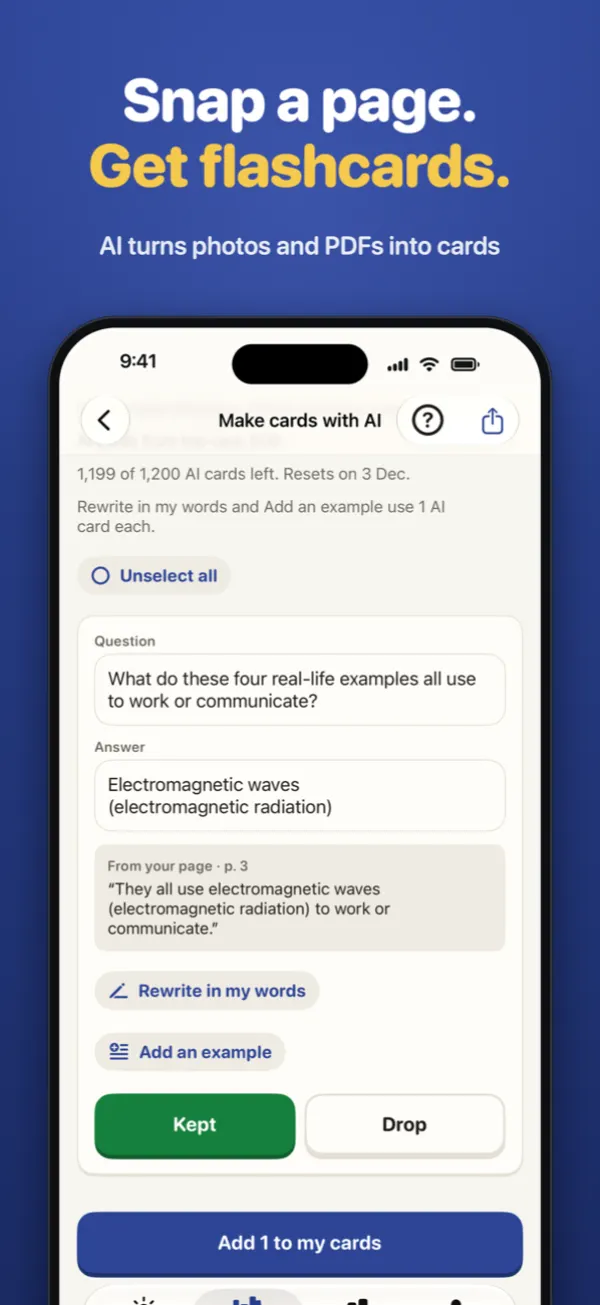
- Check every draft. Each shows its question, its answer and From your page, the sentence that backs it. Tap Keep or Drop, or edit the words.
- Add them to your cards and choose a new deck or one you already have. They appear on Today when they are due.
What you need: the AI card maker is for adults 18 and over and needs Pro or AI cards you buy. You can try it once with no account: type a topic and get 10 cards. Typed-topic cards are written from the AI's general knowledge, so they have no quote from a page.
Are AI flashcards from a PDF accurate?
AI can make mistakes, so cards from any AI tool need a check before you study them. Morywise builds that check in. Each draft from your PDF shows From your page with the quoted sentence and its page number, so you can see in a second whether the answer matches the book. Drafts the page does not prove are left out, and the app tells you how many. You decide what is kept: nothing is added until you tap to add it.
Two buttons help once a draft is right. Rewrite in my words and Add an example each use 1 AI card. Changing a card into your own words also helps you remember it.
Which PDFs give the best flashcards?
Text you can select
If you can highlight a word in the PDF, its text is clean. These PDFs give the most and the best cards.
Scans work, with fewer cards
Scanned pages are read on the phone. Very small print, or several book pages on one sheet, may not be read. Pages that cannot be read cost nothing.
Pick the pages that matter
Skip the contents, index and exercises. Morywise also skips pages with no study content, and very full pages are sent in parts.
No password
A locked PDF will not open. Remove the password in the app that made it, then choose it again.
What happens after the cards are made?
Morywise schedules every card with FSRS-6, a modern spaced repetition scheduler, and an exam countdown and exam mode help before a test date. Studying works offline. Cards you keep are yours: Export for Anki saves them as an .apkg or .colpkg file whenever you like. For photos of pages and pasted notes, see how to make flashcards from notes. Coming from Anki on iPhone? Read the Anki alternative for iPhone.
Questions people ask
Can AI make flashcards from a PDF?
Yes. An AI tool reads the text of the PDF and drafts questions and answers from it. The drafts can be wrong, so check each one against the page before you study it. Morywise shows the sentence from your page under each draft to make that check quick.
Can ChatGPT make flashcards from a PDF?
Yes. You can upload a PDF to ChatGPT and ask for questions and answers. OpenAI's help page says file uploads work on the free plan, with a limit of 3 uploads a day (checked 21 November 2026). ChatGPT does not schedule reviews, so you copy the cards into a flashcard app, and you should check every answer against your PDF.
How do I make flashcards from a PDF in Anki?
Anki has no built-in AI card maker and does not read PDFs. You can write cards by hand while you read, or put questions and answers in a plain text file (one card per line, with a comma, semicolon or tab between the sides) and use Import in Anki desktop. Anki's manual explains the file format.
Is the Morywise AI card maker free?
No. It needs Morywise Pro (US$4.99 a month or US$49.99 a year on the US App Store, with a 7-day trial) or a pack of 500 AI cards for US$1.99. You can try it once with no account: type a topic and get 10 cards. Making cards yourself, including picking text from a PDF, costs nothing.
What kind of PDF works best?
A PDF with text you can select gives the most and the best cards. Scanned pages work too, because Morywise reads them on the phone, but they can give fewer or weaker cards. One book page per PDF page reads best. Remove any password before you open the file.
How many PDF pages can I turn into cards at once?
Up to 60 pages a day. You pick a range with From page and To page. There is also a monthly page limit, and the app tells you when you reach it. Pages that cannot be read cost nothing.
Can I export the cards to Anki?
Yes. Export for Anki saves your chosen decks as an .apkg file, or everything as a .colpkg, with study history and media. Open the file in Anki to carry on there.
Sources and how we checked
We make Morywise, so read this page with that in mind. Facts about other apps come from their own pages and store listings, on the dates shown. Prices and features change; check the maker's page before you decide. Found something out of date? Email support@dexaloop.com and we will fix it.
- Anki manual: importing text files, checked 21 November 2026
- Anki manual: editing (image occlusion, Anki 23.10 and later), checked 21 November 2026
- Anki forums: AI card generators, checked 21 November 2026
- OpenAI Help Center: uploading files to ChatGPT, checked 21 November 2026
- AnkiMobile Flashcards on the US App Store, checked 21 November 2026
- Morywise on the US App Store, checked 21 November 2026
More about choosing a flashcard app
Try Morywise on your own notes.
Make your first deck from a PDF, a photo of a page or your notes, or bring in an Anki deck you already have.